MacBook & iMac Cleaning and Thermal Paste
Is your MacBook running hot, the fan never stops or it has slowed down? With full disassembly, internal cleaning and new thermal paste we get it running cool and quiet again.
- MacBook Air · MacBook Pro · iMac · Mac mini
- Genuine Apple parts
Service
About this service
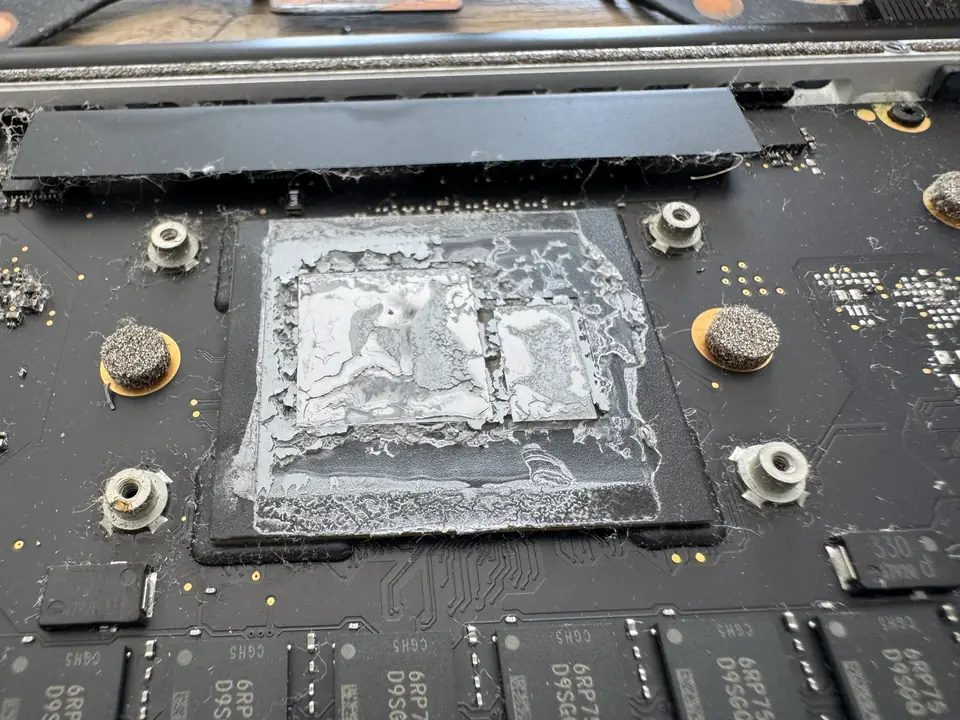
Over time dust builds up in the fan and cooling channels, and the thermal paste between the processor and the heatsink dries out. The result: the device runs hotter, the fan spins more often and louder, and macOS reduces performance to protect the processor. The slowdown you feel often comes from heat, not software.
During the service we open the device, clean the fan, channels and vents, remove the old paste and apply new. If you prefer, we use the long-lasting PTM7950 phase-change pad instead of conventional paste. We measure temperatures under load before and after, and show you the difference.
When should you contact us?
- The MacBook runs noticeably hotter than before
- The fan runs constantly and loudly
- Performance drops under heavy work (video, compiling, games)
- The device shuts down or restarts on its own
- The area above the keyboard or the bottom case gets very hot
- It has been a long time since the last internal cleaning
What we do
How it works
-
01
Tell us about the problem
Describe your device and the issue through the service request form, by phone, WhatsApp or Viber. A photo or a short video speeds up the first assessment.
-
02
We examine the device
You bring the device to our workshop in Tivat, or send it by courier. We find the cause based on measurements, tests and, when needed, opening the device — not on guesswork.
-
03
We explain your options
We tell you clearly what is faulty, which solutions are possible, the price and the time needed. Whether to go ahead is entirely your decision.
-
04
We repair and test
After your approval we carry out the repair and test the device before handing it back. We explain what we did when you collect it.
Good to know
- Fanless MacBook Air models (M1, M2, M3) have no fan to clean, but renewing the thermal paste can still lower temperatures on these models.
- The service is hardware-only; we don't access your storage or data.
- Overheating can also be caused by a faulty fan or a swollen battery. If we see anything like that, we tell you before the service.
Frequently asked questions
How often should a MacBook be serviced?
It depends on use and environment; dusty places or heavy use mean more frequent cleaning. If heat and fan noise start to increase, it may be time for an internal clean.
What is PTM7950 and how is it different from paste?
It is a phase-change thermal pad that becomes fluid when warm. It lasts far longer than conventional paste without drying out, which makes it a good choice for heavily used devices.
Does a fanless MacBook Air need servicing?
Without a fan there is no dust cleaning, but the thermal paste still dries out over time. Renewing it can make a difference on Air models that run hot.
Will the service speed up my device?
If the slowdown is caused by heat, yes; the device can run without throttling. If the slowness comes from software or storage, we tell you during the diagnosis.
Do you touch my data?
No. The service is entirely hardware-based.
Related services
MacBook & iMac Repair
Screen, battery, keyboard, trackpad and charging port replacement. Genuine Apple parts available.
Details AppleLogic Board & Chipset Repair
Component-level repair of logic board and chipset faults on devices that won't power on, won't charge or have liquid damage.
DetailsmacOS & Windows Installation
Clean installation, data backup and transfer, software setup.
Details